What is a Care Team Workload Analysis?
A Care Team Workload Analysis (CTWA) is a method for assessing how care team members allocate their time, broken into three categories of work:
-
Direct Patient Work: Tasks involving direct interaction with patients in person, via phone, or digitally. Examples include time spent with patients during appointments and patient communications.
-
Indirect Patient Work: Tasks related to patient care without direct contact. Examples include charting, prepping exam rooms and reviewing results.
-
Non-Patient Work: Tasks unrelated to individual patients. Examples include team meetings, administrative duties and training.
Use ACTT's new Care Team Workload Analysis Tool
Note: This tool performs best using the desktop version of Excel.
Before you begin, read our step-by-step how-to guide with tips for success.
Why do this work?
CTWA activities help clinics maximize time spent on direct patient care, especially by clinical staff, while minimizing non-patient tasks. It also supports:
- role clarity
- promotes the full scope of practice
- reduces duplication and low-value work
- helps reassign tasks away from constrained providers to improve access and efficiency.
-
Step 1: Team Understanding
Success depends on a clear purpose, leadership support, the right tool and staff's willingness to track their time. Start with a shared understanding of value.
“What’s in it for us—and for our patients?”
-
Step 2: Get Organized
List all team members and their roles in the clinic.
-
Step 3: Categorize Tasks
Create a list of tasks grouped under three categories: direct patient work, indirect patient work, and non-patient work.
See the List of Tasks Examples for guidance.
-
Step 4: Begin Time Tracking
Each team member then tracks the time they spend on each task over the course of a typical workday. This gives a realistic snapshot of how time is used by role and task.
-
Step 5: Input Data & View Results
Enter your clinic data into ACTT's Care Team Workload Analysis Tool to summarize and analyze the results.
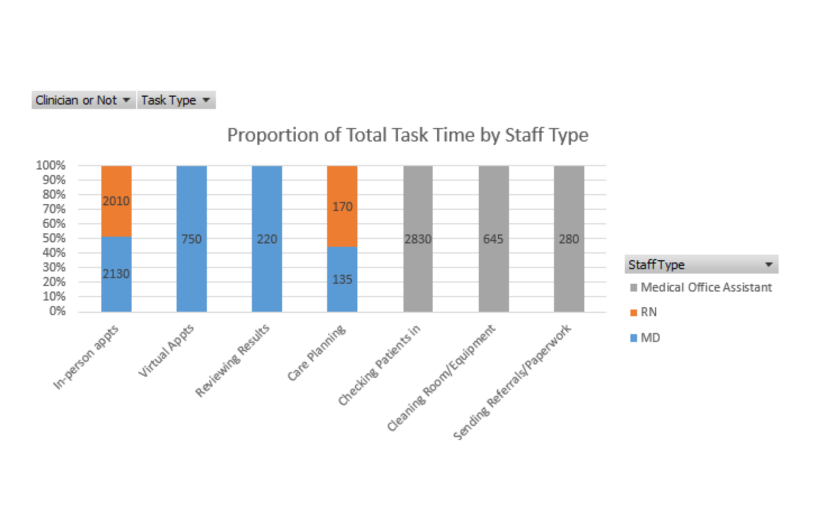
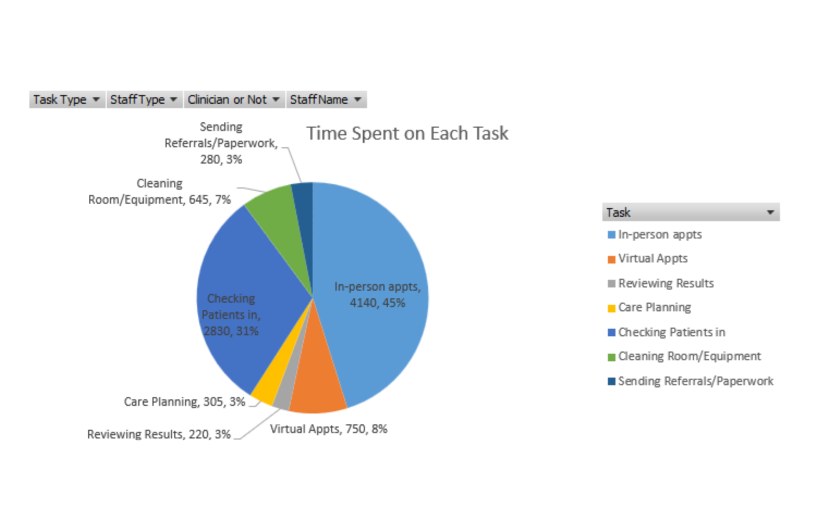
The workbook generates graphs to help visualize your data and support team discussions around improving access, efficiency and role clarity.
Tips for Success
- Track time for 1–2 weeks to get a reliable snapshot of the typical workload.
- Aim for 15–20 tasks per team member.
- Use 15–20 minute time blocks when recording activities to keep tracking simple and manageable.
- At the end of each day, ensure that your time entries total your total work hours (e.g., 7.75 hours), unless it was a partial or extended workday.
- Individual patient appointments with care providers (in person, Telehealth, Skype, etc.)
- Registering/checking in patients upon arrival
- Rooming and history taking
- Group patient appointments or classes
- Case conferences with patients and/or family members
- Pre-visit phone intake
- Appointment booking (by phone or in person)
- Phone calls with or emails to patients
- Review chart before appointment
- Charting/notes after appointment
- Specialist referral
- Lab/DI results review
- Triage
- Prep for group patient appointment/class
- Post-group debrief/notes
- Exam room preparation
- Case conferences/consults without patient/family member present
- Team huddle
- Travel to/from patient appointments
- Team meetings
- Non-patient email/phone calls
- Measurement (staff activity report, other measurement/data reporting)
- Administrative forms (e.g. timesheets, expense claims)
- Training/orientation/professional development
- Travel for meetings/training